

Managing Billing and Subscription
Last updated: Feb 2026
Estimated time to complete: 4 min.
Applies to: Air Conditioning Engineers
Summary
Manage your subscription plan, update payment details, view invoices, and understand what's included at each tier.
Your Quotestack subscription determines which features and limits are available to your team. This guide covers how to view your current plan, update payment details, and manage your billing.
Viewing Your Current Plan
Step 1. Go to Billing
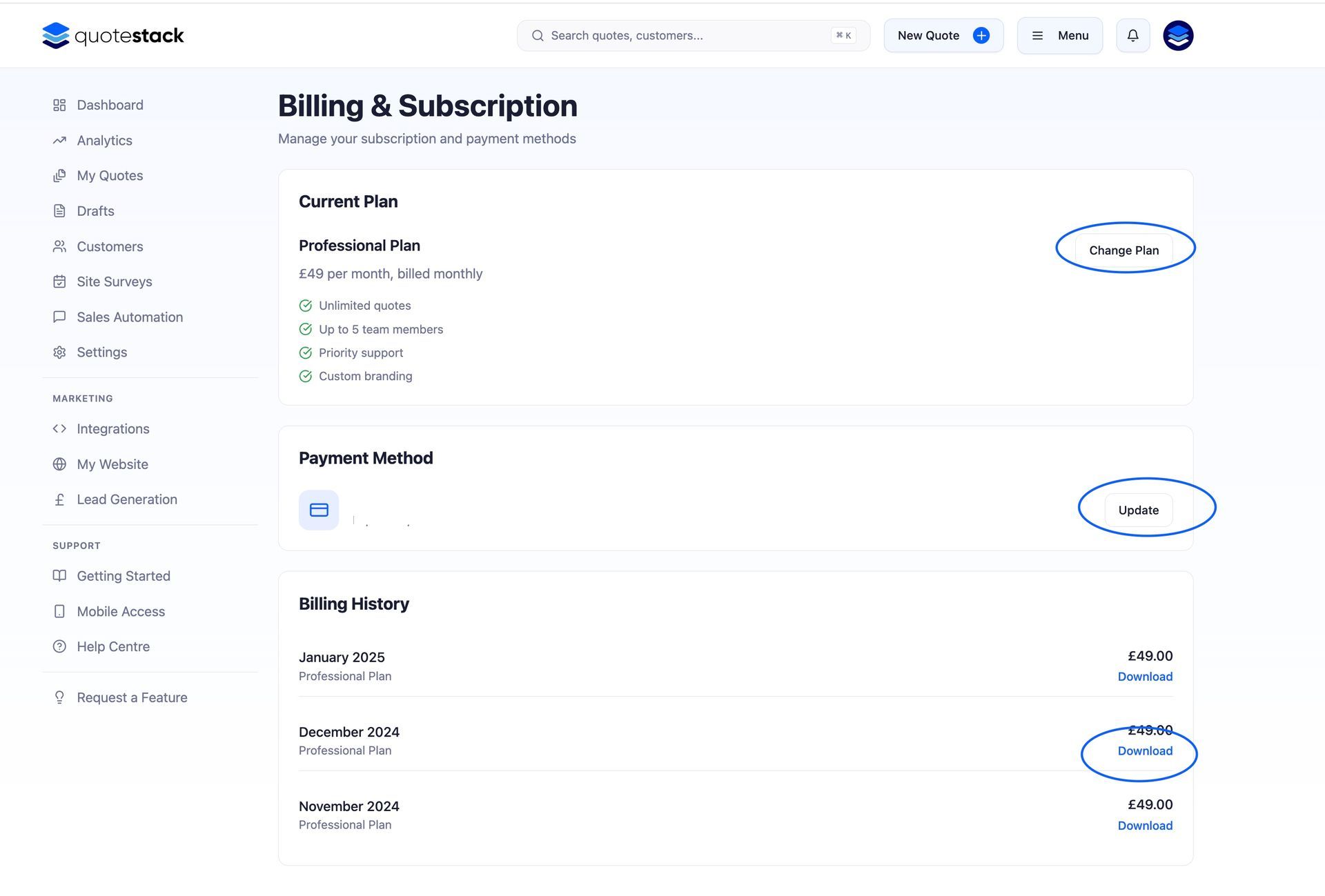
Navigate to Account > Billing from the sidebar. This page shows your current subscription plan, billing cycle, next payment date, and payment method on file.
Note
Only account Owners can access the Billing page. If you need to make changes and you're an Admin or Member, ask your account Owner.
Changing Your Plan
If your needs change for example, more team members, higher quote volumes, or access to premium features - you can upgrade or downgrade your plan at any time.
Step 2. Upgrade or downgrade
On the Billing page, click "Change Plan" to see the available tiers. Select the plan that fits your needs and confirm. Upgrades take effect immediately. Downgrades take effect at the end of your current billing cycle.
- Upgrades - you're charged a prorated amount for the remainder of the current billing period, and the new plan features are available immediately
- Downgrades - you retain access to your current plan's features until the end of the billing period, then switch to the lower plan
Warning
Downgrading may reduce your team member limit or disable certain features. Make sure your current usage fits within the lower plan's limits before downgrading.
Updating Payment Details
Step 3. Update Your Card
On the Billing page, click "Update Payment Method" to enter new card details. Your new card will be used for all future payments. The change takes effect immediately.
Quotestack accepts all major credit and debit cards. Payments are processed securely. Card details are never stored on our servers.
Viewing Invoices
Step 4. Access Your Invoices
The Billing page lists your recent invoices with dates, amounts, and payment status. Click on any invoice to view or download a PDF copy for your records.
Note
Download your invoices regularly for your business accounting. Each invoice includes your company details, the plan name, and VAT breakdown where applicable.
Failed Payments
If a payment fails (expired card, insufficient funds), Quotestack will retry the charge and notify you by email. You'll have a grace period to update your payment method before access is restricted.
- First retry - automatic, usually within 24 hours
- Email notification - sent after the first failure with a link to update your card
- Grace period - you retain full access while payment is retried
- Account restriction - if payment isn't resolved within the grace period, certain features may be limited until the balance is paid
Important
Don't ignore failed payment emails. Update your card promptly to avoid any interruption to your service. Your quotes and data are never deleted due to payment issues.
Cancelling Your Subscription
If you need to cancel your subscription:
Step 5. Cancel Your Plan
On the Billing page, click "Cancel Subscription". You'll retain access to all features until the end of your current billing period. After that, your account moves to a free or read-only state - your data is preserved but you won't be able to create new quotes.
- Your data is never deleted - you can reactivate at any time and pick up where you left off
- Active quotes and customer records remain accessible in read-only mode
- Automated follow-ups and widget submissions are paused during cancellation
- You can resubscribe at any time to restore full functionality
Note
If you're cancelling because of a specific issue or missing feature, consider reaching out to support first — we may be able to help or add the feature you need.
Did this answer your question?
😃
😐
😞
Great! We’re glad we could help.
Not quite what you needed? Discover more articles here
If you'd like you can ask our team